
 guidohollander
0979bf94f9
guidohollander
0979bf94f9
|
3 years ago | |
|---|---|---|
| .husky | 3 years ago | |
| .vscode | 3 years ago | |
| src | 3 years ago | |
| typings-custom | 3 years ago | |
| .eslintrc | 3 years ago | |
| .eslintrc copy.js | 3 years ago | |
| .eslintrc.cjs | 3 years ago | |
| .gitignore | 3 years ago | |
| .npmignore | 3 years ago | |
| .prettierrc.json | 3 years ago | |
| 6 | 3 years ago | |
| package-lock.json | 3 years ago | |
| package.json | 3 years ago | |
| readme.md | 3 years ago | |
| solutions.json | 3 years ago | |
| tsconfig.eslint.json | 3 years ago | |
| tsconfig.json | 3 years ago | |
readme.md
Anglo helper (CLI)
Anglo helper is a command line interface (CLI) that will assist with SVN switches and SVN updates of Anglo projects, detect missing projects, execute any general or component-level flyway scripts and validate the structure of Anglo specific projects.
Requirements
- Node.js LTS 16.17.0 (including NPM 8.15.0).
- Tortoise SVN An SVN client for Windows.
Installation steps
- Start an elevated command prompt or any other terminal as administrator (i.e. git bash, windows terminal, powershell console).
- Issue the following command
npm install anglo-helper@latest -g. This will install Anglo helper as global module, which enables you to run it from any (workspace) folder. - Close the elevated command prompt and start a regular, non-elevated command prompt and navigate (change directory) to one of your workspace folders
- Run
anglo-helper. Since it is the first run, a number of questions will be asked in order to create a profile in /profile_1.json. If applicable, use the same structure as suggested, for example when specifying the flyway folder: use forward slashes, including a trailing slash. You can always edit your profile (/profile_1.json) in case something went wrong or something is missing.
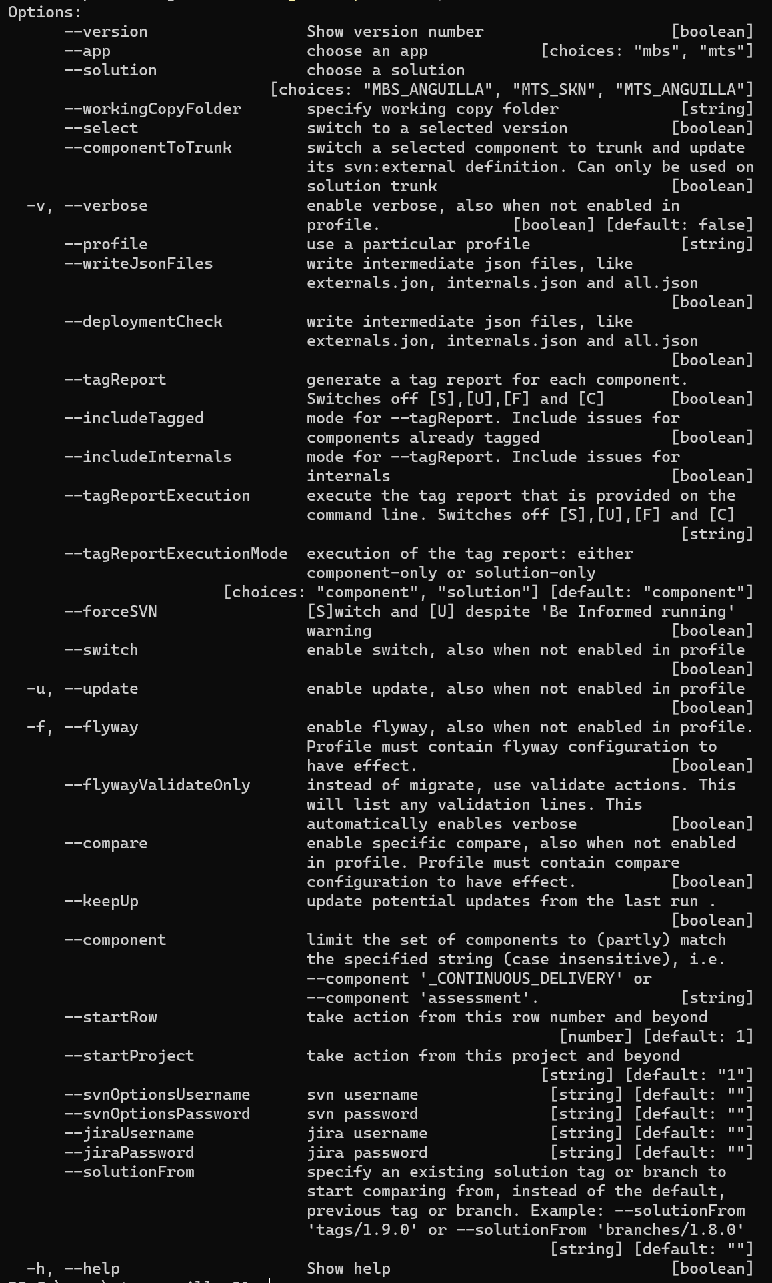
Command line options (anglo-helper --version)
Examples
-
Run Anglo Helper with the default profile (profile_1.json). At first run, the default profile is created based on a questionaire.
$
anglo-helper -
Show all Anglo-helper command line options.
$
anglo-helper --help -
Change or copy your profile
$
nano profile_1.jsonornotepad profile_1.json -
Run Anglo Helper with an alternative profile (i.e., anglo-helper_profile_update.json)
$
anglo-helper --profile profile_update.json -
Select an svn version to upgrade or downgrade your current workspace to. Anglo-helper will automatically switch
$
anglo-helper --select -
Perform a deployment check, meaning that all externals should have been tagged
$
anglo-helper --deploymentCheck -
Override profile settings for to enable switch, update, flyway, verbose. Can be combined
$
anglo-helper --update$
anglo-helper --flyway --verbose
etc. -
Force anglo-helper to perform actions on a subset of projects. Can be combined with other arguments
$ `anglo-helper --component 'Payout'
License
The MIT License (MIT)
Copyright (c) 2020 Hollander Consulting
Permission is hereby granted, free of charge, to any person obtaining a copy of this software and associated documentation files (the "Software"), to deal in the Software without restriction, including without limitation the rights to use, copy, modify, merge, publish, distribute, sublicense, and/or sell copies of the Software, and to permit persons to whom the Software is furnished to do so, subject to the following conditions:
The above copyright notice and this permission notice shall be included in all copies or substantial portions of the Software.
THE SOFTWARE IS PROVIDED "AS IS", WITHOUT WARRANTY OF ANY KIND, EXPRESS OR IMPLIED, INCLUDING BUT NOT LIMITED TO THE WARRANTIES OF MERCHANTABILITY, FITNESS FOR A PARTICULAR PURPOSE AND NONINFRINGEMENT. IN NO EVENT SHALL THE AUTHORS OR COPYRIGHT HOLDERS BE LIABLE FOR ANY CLAIM, DAMAGES OR OTHER LIABILITY, WHETHER IN AN ACTION OF CONTRACT, TORT OR OTHERWISE, ARISING FROM, OUT OF OR IN CONNECTION WITH THE SOFTWARE OR THE USE OR OTHER DEALINGS IN THE SOFTWARE.